Investing In The Future
Data Set Protection Retooled and Reimagined
SENTINELn is a robust change management solution designed to monitor, track, and restore z/OS data sets with absolute precision. With built-in recovery, a dynamic user interface and audit readiness, your teams can confidently program without compromising critical z/OS data sets.

-

Automated Backup Control
Automatically captures member-level backups, maintaining a history of versioned resources to improve data protection and control.
-

Real Time Monitoring and Recovery
Tracks real-time changes to critical system and application software. Seamlessly roll back changes and restore data backups.
-

Manage Member-Level Access
Controls library modifications by limiting access to designated members, ensuring only approved users are permitted to make changes.
-

Documentation of Changes
Enables users to record the purpose of updates made to critical members of protected resources, creating a clear audit trail that supports accountability and thorough change documentation.
-

Auditing and Integrity Verification
Generates detailed reports, ensuring the integrity of your production data sets and load libraries.
-

Automation Pipeline Integration
Command-line interface enables seamless integration with automation pipelines. Teams can automate processes faster, improve reliability, and scale operations with confidence.
.png?width=300&height=317&name=Sentinel-Icon%20(1).png)
-

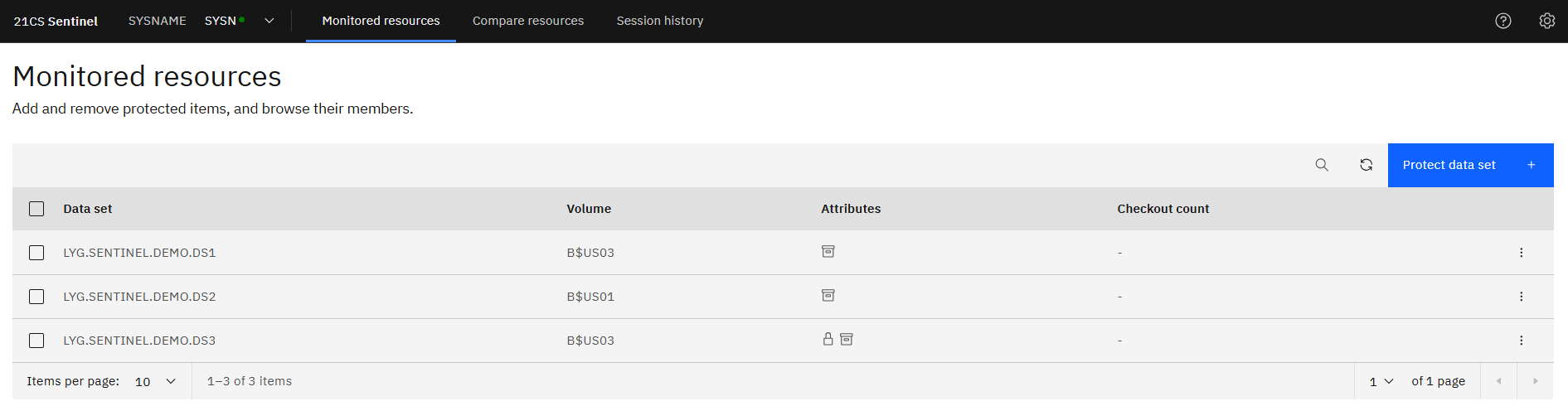
Monitored Resources
This shows the initial view seen. Lists the protected data sets.
Example - LYG.SENTINEL.DEMO.DS1 – DS3 are shown as protected.
-
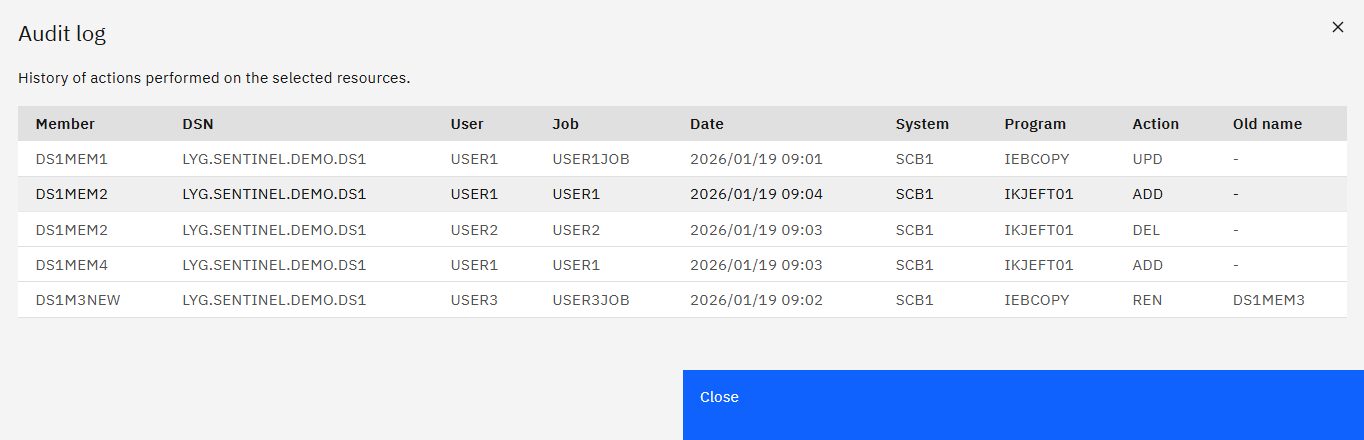
DS Audit Log
Example - ‘View audit log’ was selected for data set LYG.SENTINEL.DEMO.DS1. It shows:
- Member DS1MEM1 had 1 update - Member DS1MEM2 was DELeted then ADDed
- Member DS1MEM4 was ADDed - Member DS1M3NEW was original named DS1MEM3
Actions Show:
- the User who initiated the event - the Job that called the program to cause the event
- the Date/Time when the event was recorded - the Program that caused the event
When selecting “Browse Members” of a data set, you can look at information relating to just that data set.
-
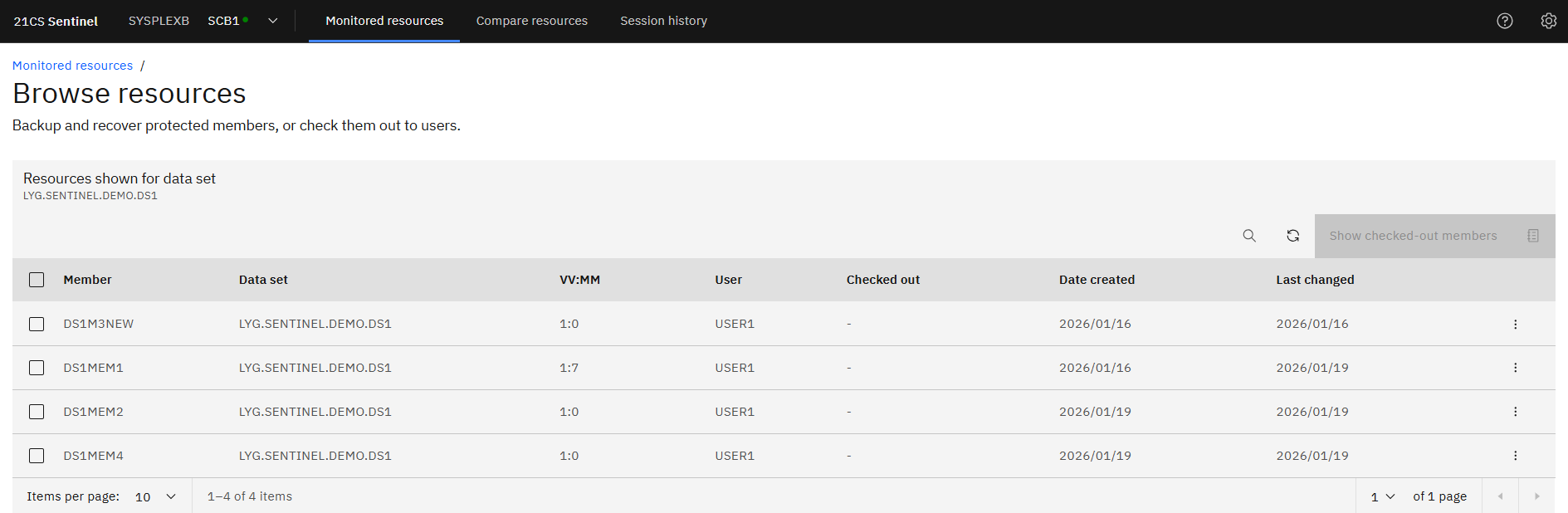
Browse Resources
Like the initial plugin screen, except narrowing down to a data set.
Example - For LYG.SENTINEL.DEMO.DS1, shows there are currently 4 members within the data set.
-
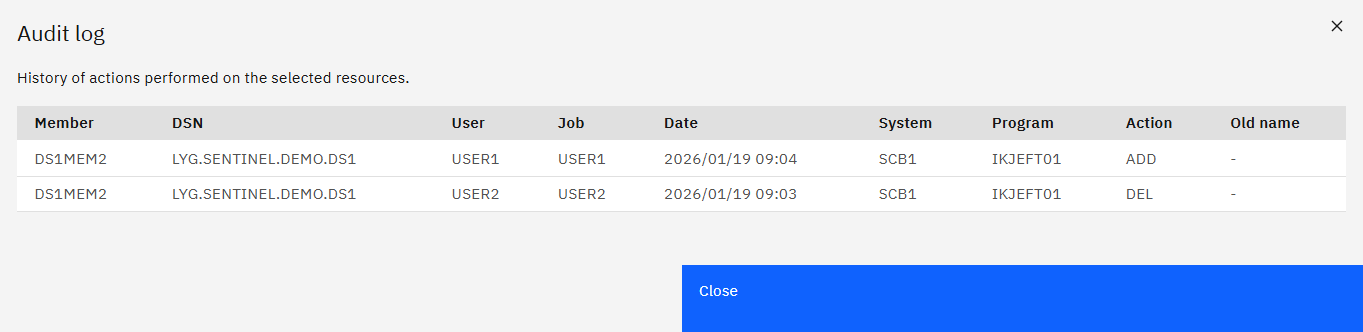
Member Audit Log
This displays the audit log for a member and all events registered against it. Displays the same information as the previous audit log, just filtered to a member. Useful if a data set contains a lot of events and you just want to focus on a member at a time.
Example - Same as before, just focuses on DS1MEM2.
-
Member Backup
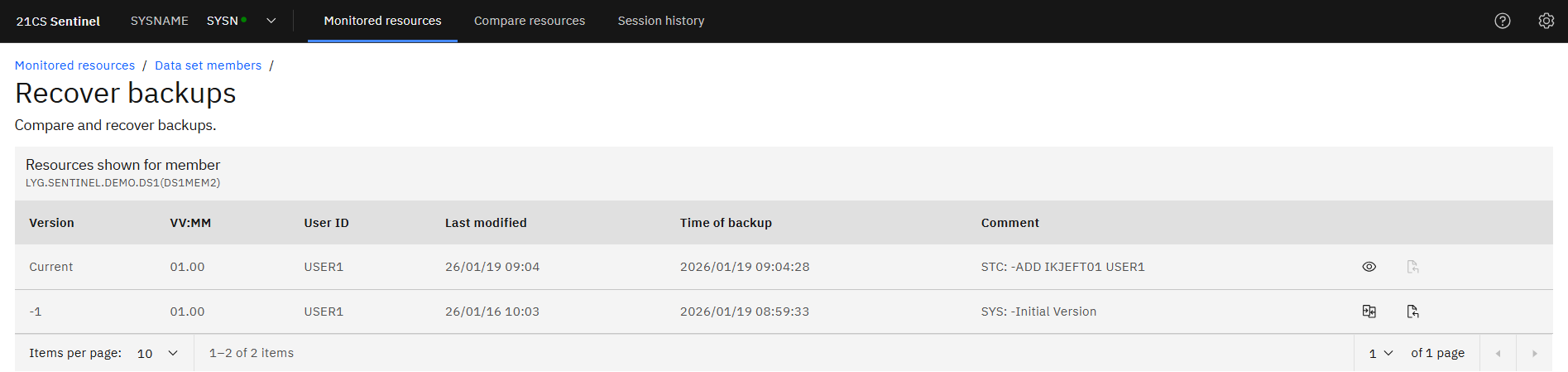
When selecting to “Recover backups”, a list of backups associated to then member is shown.
NOTE – this is only available if the option to take backups was set when initially protecting the data set.
Example - Member DS1MEM2 of LYG.SENTINEL.DEMO.DS1DS1MEM2 has 2 versions.
- Current (what is currently available)
- The initial version: when the data set was initially protected or when the member was first created after the data set was protected.
- Current: the auditor has the option to browse the current member (using the eye icon)
- 1 … -n: the auditor has the option to compare it against the current version or recover the backup (no screenshot for backup recover taken, as assuming not an auditor task)
-
Backup Compare
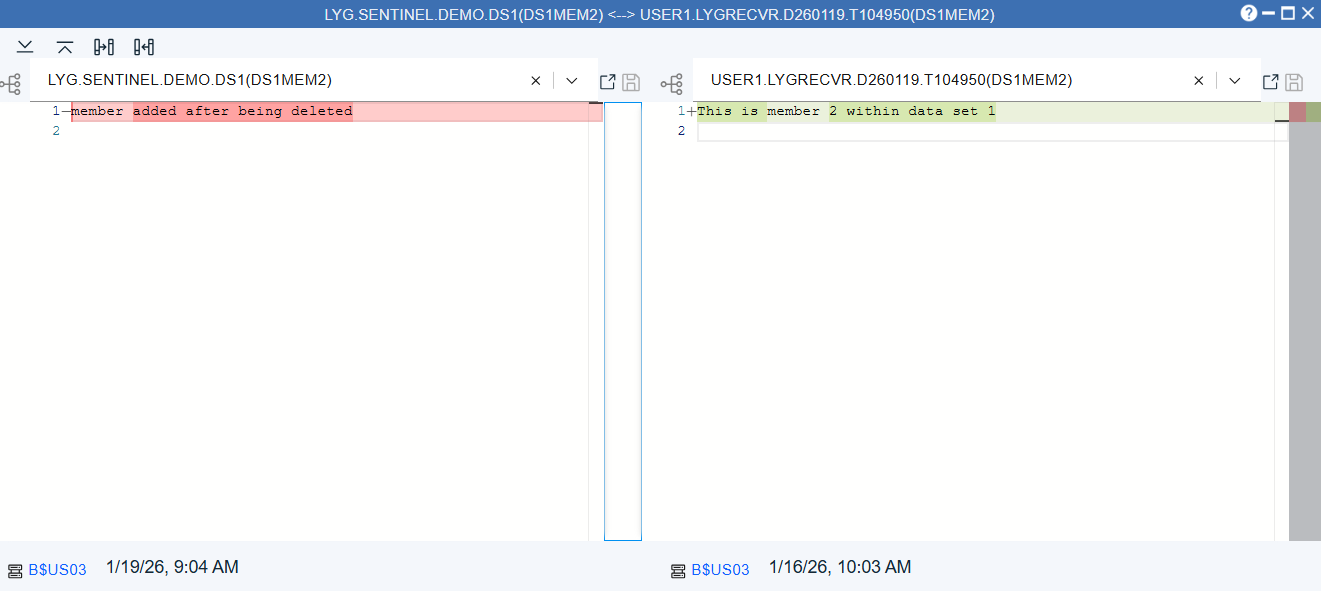
Allows the auditor to compare a backup version against the current version.
Example
- The Current version is shown on the left.
- The selected backup version (in this case -1 as that is the only version) is shown on the right.
- The backup version is listed in a data set with a unique name (associated to the User and the date/time). This data set name can me modified. If the auditor choses to modify the backup version, it can be saved to the temporary data set. The backup itself cannot be overwritten.
-
Compare
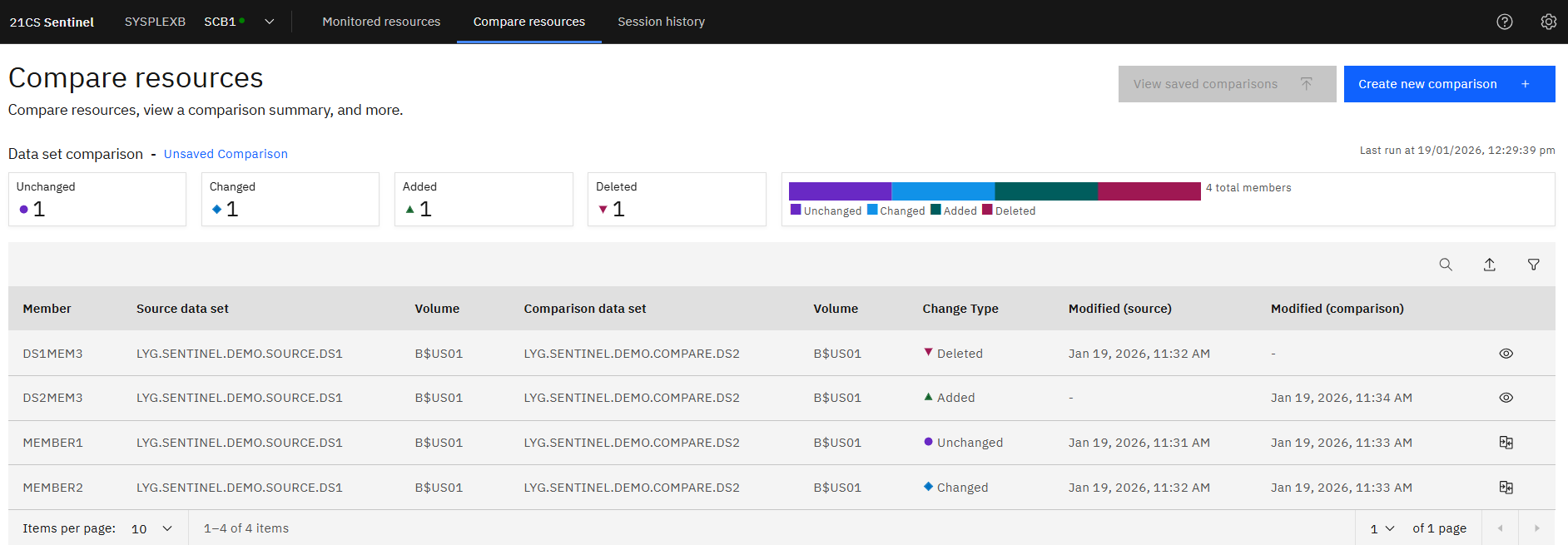
Allows the auditor to compare 2 data sets. These do not have to be protected in Change Tracker.
Example - 2 data sets were set to be compared:
- LYG.SENTINEL.DEMO.SOURCE.DS1 – contains 3 members
- LYG.SENTINEL.DEMO.COMPARE.DS2 – contains 3 members
- DS1MEM3 is missing (deleted) from LYG.SENTINEL.DEMO.COMPARE.DS2
- DS2MEM3 was added to LYG.SENTINEL.DEMO.COMPARE.DS2
- Both data sets contain MEMBER1 and the contents are the same for each
- Both data sets contain MEMBER2, but the contents differ between them
-
Compare Change
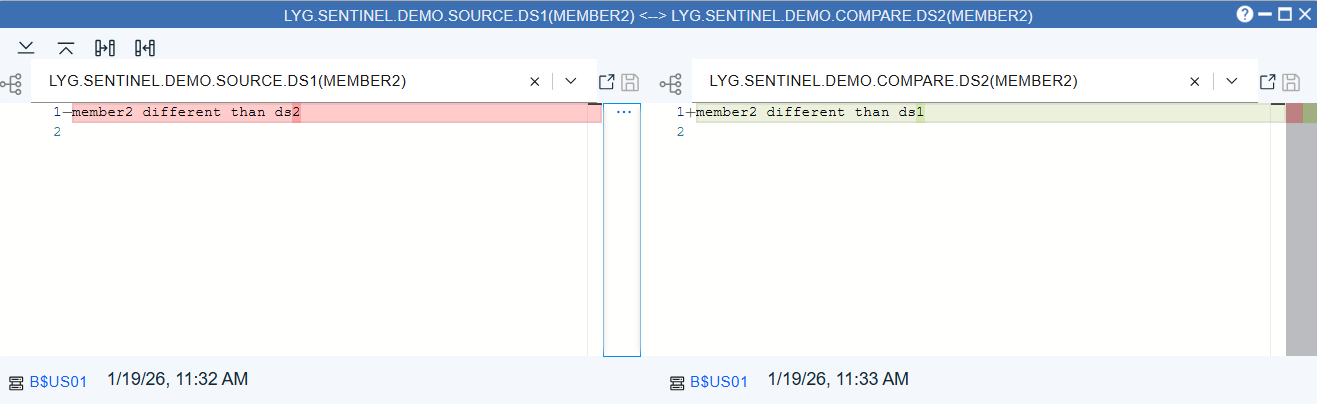
When a compare highlights a difference between members, a compare can be done to look at what the differences are.
Example - From earlier, MEMBER2 is showing a difference. Compare shows the original (source) on the left and what it is being compared to on the right. Here we see that ds1 has been changed to ds2.